
TypeScript 支持
支持的版本
🆕 9.2+
VueI18n 使用资源,包括本地化消息、日期时间格式和数字格式。 特别是,本地化消息可以作为 i18n 资源外部化,如 json 文件,以便与本地化服务协作,并且这些资源可以导入以进行协作。
为了与本地化服务结合实现顺畅的本地化工作流程,您可能希望防止缺失本地化或外部化 i18n 资源的资源定义缺失。 在开发过程中,您可能不希望因使用翻译函数(如 $t)时的键字符串错误而破坏开发者体验。
带模式的类型安全资源
您可以使用 TypeScript 支持带资源模式的类型安全资源。
在 createI18n 中的类型安全资源
以下是如何为 createI18n 选项中定义的 messages 定义类型安全资源的示例代码。
本地化消息资源:
{
  "world": "the world!"
}
应用程序入口点:
import { createI18n } from 'vue-i18n'
import enUS from './locales/en-US.json'

// 将 'en-US' 定义为资源的主模式
type MessageSchema = typeof enUS

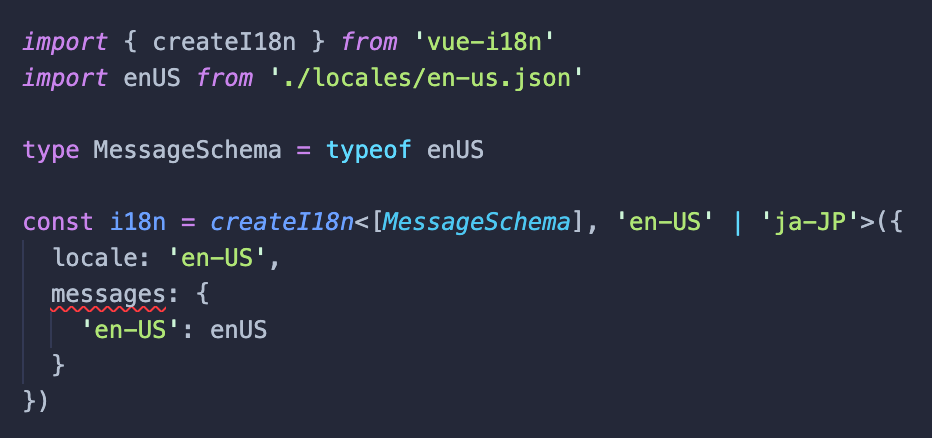
const i18n = createI18n<[MessageSchema], 'en-US' | 'ja-JP'>({
  locale: 'en-US',
  messages: {
    'en-US': enUS
  }
})
上述代码从 createI18n 选项中的 messages 指定的 en-US 消息资源定义了一个类型。此定义的类型是使用 VueI18n 处理的消息资源的主模式。这意味着您可以将其定义为应用程序中的单一真理来源资源。您可以通过指定从消息资源配置定义的模式类型作为 createI18n 类型参数的第一个参数来在其他语言环境中定义类型安全的资源。
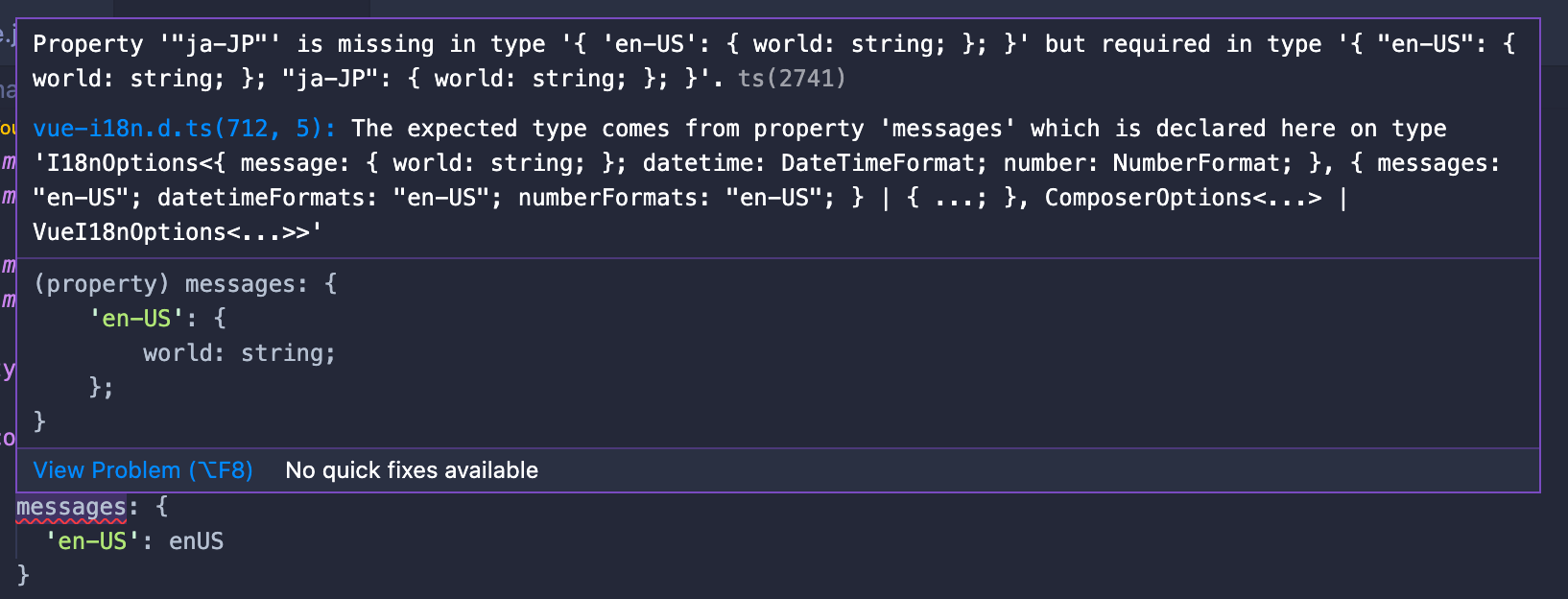
createI18n 类型参数的第二个参数是要处理的语言环境。通过这个,基于第一个参数中指定的资源类型,对第二个参数中指定的每个语言环境进行类型检查。在上面的代码示例中,en-US 和 ja-JP 被指定为主要语言环境,这也指定在 locale 选项中。如果在这种状态下编译 TypeScript,您将得到以下错误来检查 messages 选项中未定义 ja-JP 资源。
$ npx tsc
npx tsc
src/main.ts:11:3 - error TS2741: Property '"ja-JP"' is missing in type '{ 'en-US': { world: string; }; }' but required in type '{ "en-US": { world: string; }; "ja-JP": { world: string; }; }'.

11   messages: {
     ~~~~~~~~

  node_modules/vue-i18n/dist/vue-i18n.d.ts:712:5
    712     messages?: {
            ~~~~~~~~
    The expected type comes from property 'messages' which is declared here on type 'I18nOptions<{ message: { world: string; }; datetime: DateTimeFormat; number: NumberFormat; }, { messages: "en-US"; datetimeFormats: "en-US"; numberFormats: "en-US"; } | { ...; }, ComposerOptions<...> | VueI18nOptions<...>>'
如果您使用 Visual Studio Code 作为编辑器,在运行 TypeScript 编译之前,您可以在编辑器中注意到资源定义遗漏的错误。
在 useI18n 中的类型安全资源
类型安全资源不仅可以用 createI18n 定义,也可以在使用组合式 API 的 useI18n 中按组件分别定义。
除了本地消息外,资源类型定义还可以包括日期时间格式和数字格式。
以下是在 useI18n 中按组件分别定义本地化消息和数字格式类型安全资源的示例代码。
在 Vue 组件中导入的本地化消息:
{
  "messages": {
    "hello": "Hello, {name}!"
  }
}
带有类型安全资源的 Vue 组件:
<script setup lang="ts">
import { useI18n } from 'vue-i18n'
import enUS from './en-US.json' // 导入 Vue 组件的本地化消息

// 定义 Vue 组件的消息模式
type MessageSchema = typeof enUS

// 定义 Vue 组件的数字格式模式
type NumberSchema = {
  currency: {
    style: 'currency'
    currencyDisplay: 'symbol'
    currency: string
  }
}

/*
 * 您可以在第一个类型参数中使用对象文字指定您的定义模式
 * 关于类型参数,参见 http://vue-i18n.intlify.dev/api/composition.html#usei18n
 */
const { t, n } = useI18n<{
  message: MessageSchema,
  number: NumberSchema
}, 'en-US'>({
  inheritLocale: true,
  messages: {
    'en-US': enUS
  },
  numberFormats: {
    'en-US': {
      currency: {
        style: 'currency',
        currencyDisplay: 'symbol',
        currency: 'USD'
      }
    }
  }
})
</script>

<template>
  <p>message: {{ t('messages.hello', { name: 'kazupon' }) }}</p>
  <p>currency: {{ n(1000, 'currency') }}</p>
</template>
通过在 useI18n 的第一个类型参数中指定定义的模式,您可以使用 TypeScript 检查本地化消息和数字格式的未定义资源。另外,通过指定第二个类型参数中要定义的语言环境,TypeScript 可以检查未定义的语言环境。
限制
- 不支持 SFC 中的 i18n 自定义块的类型安全。我们计划在未来支持它。
- 当前仅支持
JSON格式。
迄今为止描述的代码作为 示例 可用。让我们检查一下!
类型安全支持的 API
其他 API 支持类型参数,允许您指定资源的模式以进行类型安全的资源操作,例如:
getLocaleMessagesetLocaleMessagemergeLocaleMessagegetDateTimeFormatsetDateTimeFormatmergeDateTimeFormatgetNumberFormatsetNumberFormatmergeNumberFormat
有关更多详细信息,请查看以下 API 文档页面。
资源键补全支持
注意
资源键补全仅在您使用 Visual Studio Code 时可用
除了支持类型安全的资源定义之外,VueI18n 现在在组合式 API 中提供了 t 和 d 等 API 来插入资源键。
以下显示了如何在上述本地作用域 Vue 组件中插入资源键的 Visual Studio Code 方法。
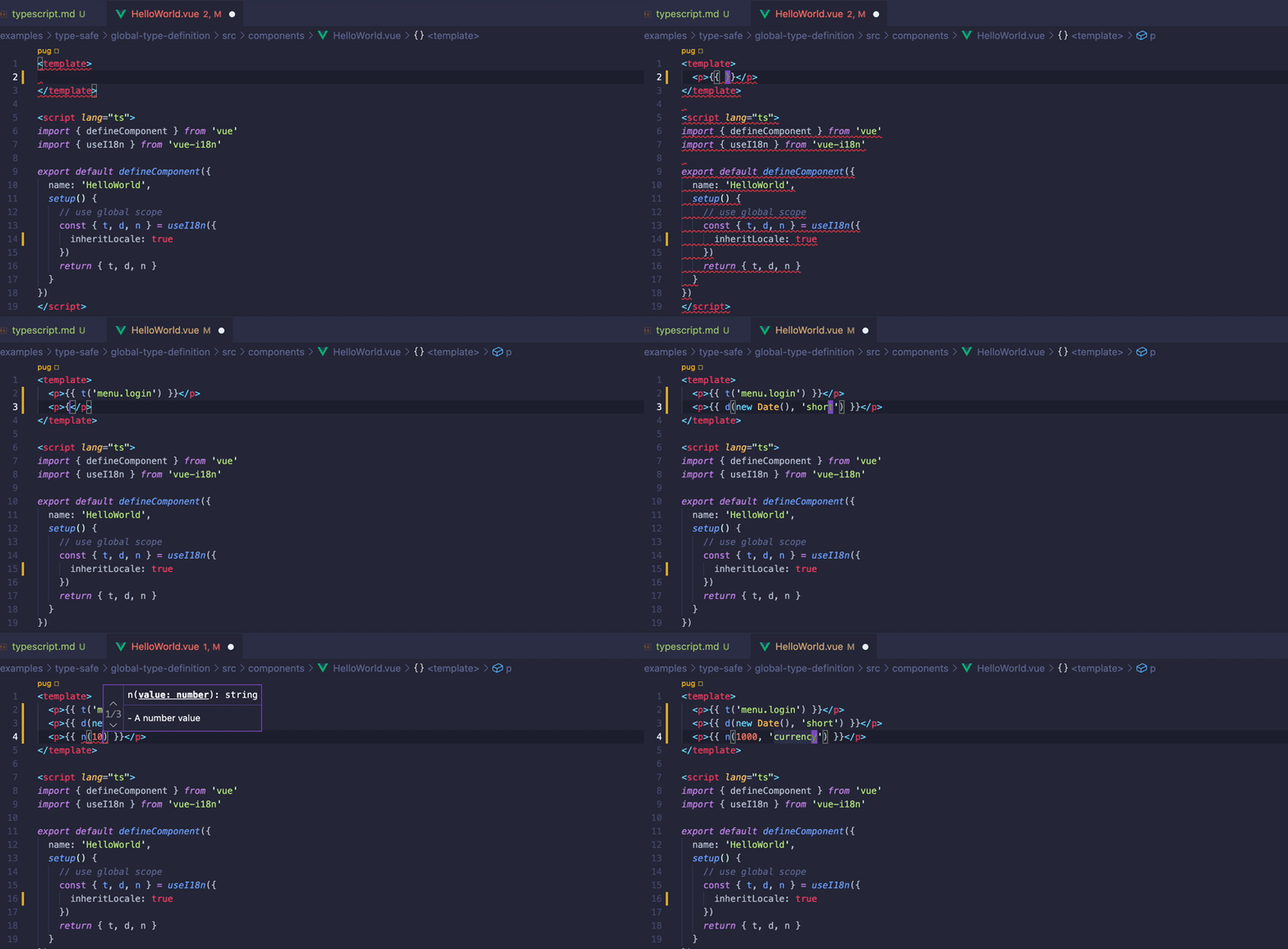
资源键插入支持可以防止翻译缺失。
在您的项目中,您可能有不使用本地作用域而是使用全局作用域的所有内容的 Vue 组件。
对于这种使用情况,您还可以通过在 useI18n 的类型参数中明确指定为全局作用域定义的模式来支持资源键插入。
为全局作用域定义模式:
/**
 * 定义资源模式
 */

import enUS from './en-US.json'

// 将消息模式定义为主消息模式
export type MessageSchema = typeof enUS

// 定义数字格式模式
export type NumberSchema = {
  currency: {
    style: 'currency'
    currencyDisplay: 'symbol'
    currency: string
  }
}
然后,只需导入定义的模式并在 useI18n 中将其用作类型参数,如以下 Vue 组件所示:
<script lang="ts">
import { useI18n } from 'vue-i18n'

// 导入全局作用域的资源模式
import type { MessageSchema, NumberSchema } from '../locales/schema'

const { t, n } = useI18n<{ message: MessageSchema, number: NumberSchema }>({
  useScope: 'global'
})
</script>

<template>
  <p>message: {{ t('hello') }}</p>
  <p>currency: {{ n(1000, 'currency') }}</p>
</template>
结果,您可以使用 VueI18n 提供的 API(如 t 和 n)进行资源键插入。
注意
传统模式以及通过组合式 API 的 globalInjection: true 注入到组件中的 $t 和 $d 等 API 的资源键插入,需要显式指定类型参数。
有关更多详细信息,请查看 API 文档。 https://vue-i18n.intlify.dev/api/injection.html
全局资源模式类型定义
在 VueI18n 中,您可以使用 TypeScript 特性扩展接口来定义全局作用域级别的资源类型。
如果您的项目将所有资源都作为全局作用域使用,那么轻松处理类型安全资源会非常方便。
VueI18n 提供以下接口:
DefineLocaleMessage:用于全局定义本地化消息模式的接口DefineDateTimeFormat:用于全局定义日期时间格式模式的接口DefineNumberFormat:用于全局定义数字格式模式的接口
通过使用这些接口和 declare module,您可以定义 VueI18n 的全局模式。
以下是在 d.ts 中定义的全局模式示例:
/**
 * 您需要导入某些接口
 */


declare module 'vue-i18n' {
  // 定义本地化消息模式
  export interface DefineLocaleMessage {
    hello: string
    menu: {
      login: string
    }
    errors: string[]
  }

  // 定义日期时间格式模式
  export interface DefineDateTimeFormat {
    short: {
      hour: 'numeric'
      minute: 'numeric'
      second: 'numeric'
      timeZoneName: 'short'
      timezone: string
    }
  }

  // 定义数字格式模式
  export interface DefineNumberFormat {
    currency: {
      style: 'currency'
      currencyDisplay: 'symbol'
      currency: string
    }
  }
}
通过使用 declare module 和 VueI18n 提供的接口,您可以定义全局资源的模式。
以前,在使用 createI18n 和 useI18n 与全局作用域资源类型定义时,有必要将每个资源都指定为类型参数。 这样,您就不需要这样做。
以下是以 createI18n 为例:
import { createI18n, type I18nOptions } from 'vue-i18n'

/**
 * 从 json 导入本地化消息资源用于全局作用域
 */
import enUS from './locales/en-US.json'
import jaJP from './locales/ja-JP.json'

const options: I18nOptions = {
  legacy: false,
  locale: 'ja-JP',
  fallbackLocale: 'en-US',
  messages: {
    'en-US': enUS,
    'ja-JP': jaJP
  },
  datetimeFormats: {
    'ja-JP': {
      short: {
        hour: 'numeric',
        minute: 'numeric',
        second: 'numeric',
        timeZoneName: 'short',
        timezone: 'Asia/Tokyo'
      }
    }
  },
  numberFormats: {
    'ja-JP': {
      currency: {
        style: 'currency',
        currencyDisplay: 'symbol',
        currency: 'JPY'
      }
    }
  }
}

/**
 * 使用全局类型定义的 i18n 资源设置 vue-i18n。
 * 如果您在 `*.d.ts` 中定义了 i18n 资源模式,这些将由 TypeScript 检查。
 */
const i18n = createI18n<false, typeof options>(options)
上面 createI18n 的第一个类型参数未指定资源的模式类型。上面只是为 createI18n 创建的 i18n 实例的 global 属性指定类型提示。 (如果为 false,类型为组合式 API 的 Composer 实例,如果为 true,类型为传统 API 的 VueI18n 实例)
createI18n 的第二个类型参数指定选项的类型提示。
在 Vue 组件使用的 useI18n 情况下,看起来像这样:
<script setup lang="ts">
import { useI18n } from 'vue-i18n'

// 使用全局作用域
const { t, d, n } = useI18n({
  inheritLocale: true
})
</script>

<template>
  <p>`t` 资源键补全: {{ t('menu.login') }}</p>
  <p>`d` 资源键补全: {{ d(new Date(), 'short') }}</p>
  <p>`n` 资源键补全: {{ n(1000, 'currency') }}</p>
</template>
从上面的代码可以看出,您不需要为 useI18n 的类型参数指定任何内容。您可以不用指定就插入 t、d 和 n 等 API 资源键。